Tarea Matlab
Contents
Ejercicio 1
Curva de Bezier
% Apartado a)
type factr
% Apartado b)
type combina
% Apartado c)
type bernstein
type dibujaBernstein
dibujaBernstein
% Apartado d)
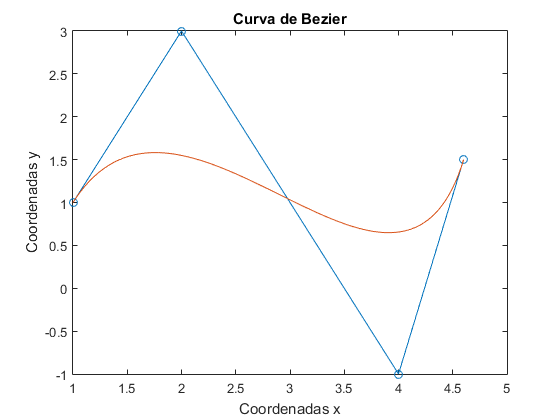
figure(1)
t=linspace(0,1);
V=[1 2 4 4.6;1 3 -1 1.5];
plot(V(1,:),V(2,:),'-o')
n=size(V);
n=n(2);
s=size(t);
x=zeros(n,s(2));
y=zeros(n,s(2));
for  i=1:n
    x(i,:)=bernstein(n-1,i-1,t)*V(1,i);
    y(i,:)=bernstein(n-1,i-1,t)*V(2,i);
end
a=sum(x);
b=sum(y);
hold on
plot(a,b)
xlabel('Coordenadas x');
ylabel('Coordenadas y');
title('Curva de Bezier');
hold off
% Apartado a)
function x = factr(n)
    if n<0
       disp('El factorial se define para n positivo')
       x=-1;
    else if n==0
            x=1;
        else
           x = n .* factr(n-1) ;
        end
    end
 end

% Apartado b)
function x = combina(n,i)
    if n<i
       disp('El primer argumento debe ser mayor que el segundo')
       x=-1;
    else
        x=factr(n)/(factr(i)*factr(n-i));
    end
 end

% Apartado c)
function x=bernstein(n,i,t)
x=combina(n,i)*t.^i.*(1-t).^(n-i);
end

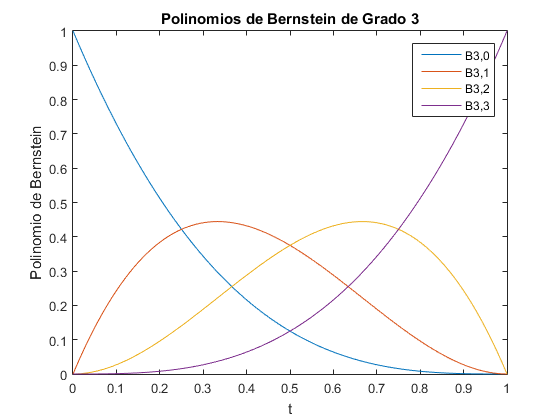
%apartado c)
t=linspace(0,1);
n=3;
for i=0:n
    b=bernstein(n,i,t);
    plot(t,b)
    hold on
end
xlabel('t')
ylabel('Polinomio de Bernstein');
title('Polinomios de Bernstein de Grado 3');
legend('B3,0','B3,1','B3,2','B3,3');
Ejercicio 2
Velocidad del Viento y Potencia del Generador
% Apartado a)
vel = xlsread('sotaventogaliciaanual');
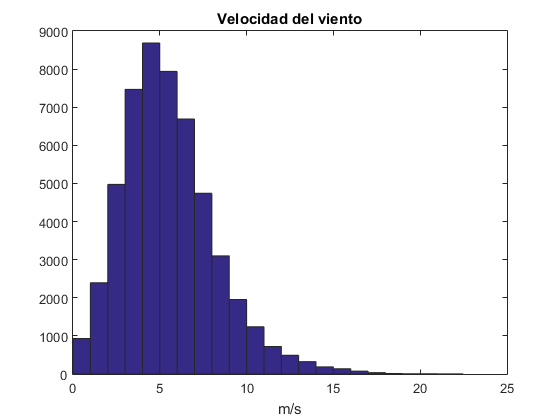
figure(2)
x=0.5:1:max(vel);
hist(vel,x)
title('Velocidad del viento')
xlabel('m/s')
% Apartado b)
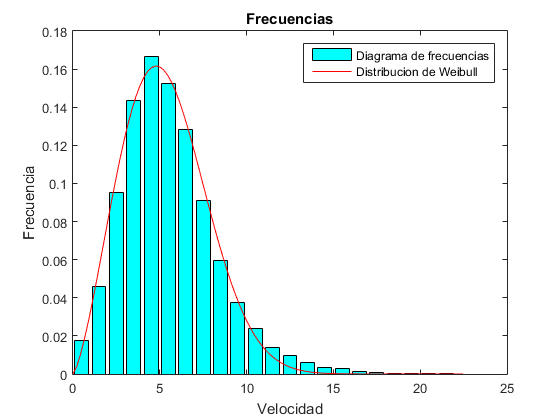
% Diagrama de frecuencias
figure(3)
horas=1/6*hist(vel,x);
frec=horas/sum(horas);
bar(x,frec,'c')
% Ajuste distribución de Weibull
hold on
f=@(a,x) (a(1)/a(2))*((x/a(2)).^(a(1)-1)).*exp(-(x/a(2)).^a(1));
a0=[2 8];
ck=nlinfit(x,frec,f,a0);
x=linspace(0,max(vel),100);
y=f(ck,x);
plot(x,y,'r')
title('Frecuencias');
xlabel('Velocidad')
ylabel('Frecuencia')
legend('Diagrama de frecuencias','Distribucion de Weibull')
hold off
% Apartado c)
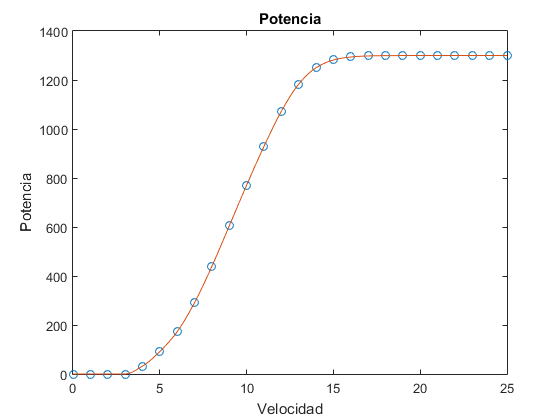
figure(4)
potencia = xlsread('sotavento_curva potencia');
tam=size(potencia);
plot(potencia(:,1),potencia(:,2))
x1=0:0.2:25;
y1=interp1(potencia(:,1),potencia(:,2),x1,'pchip');
plot(potencia(:,1),potencia(:,2),'o',x1,y1)
title('Potencia');
xlabel('Velocidad');
ylabel('Potencia');
% Apartado d)
% Potencia media
k=mean(vel);
c=std(vel);
f=@(x) (k/c)*((x/c).^(k-1)).*exp(-(x/c).^k);
quad(f,0,25);
g=@(x) x.*f(x);
% Este valor coincide con c*gamma(1+1/k)
potenciamedia=quad(g,0,25)
potenciamedia =

    2.4796
Ejercicio 3
Movimiento de un sistema Masa-Resorte-Amortiguador
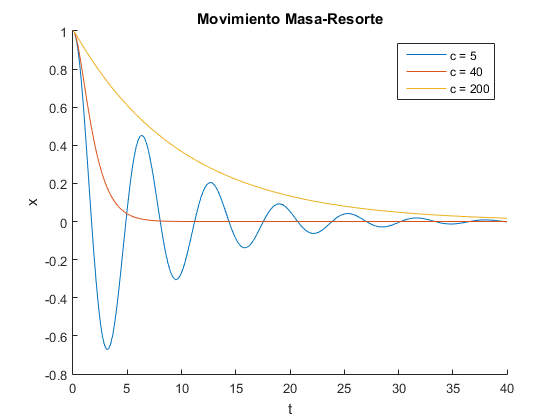
figure(5)
c=[5 40 200];
m=20;k=20;
x0=[1,0]; %1 es el desplazamiento inicial, 0 es la velocidad inicial
hold on
for j=1:3
    f=@(t,x) [x(2);-c(j)/m*x(2)-k/m*x(1)];
    [t,x]=ode45(f,[0,40],x0);
    plot(t,x(:,1))
end
hold off
title('Movimiento Masa-Resorte')
xlabel('t')
ylabel('x')
legend('c = 5','c = 40','c = 200')
Ejercicio 4
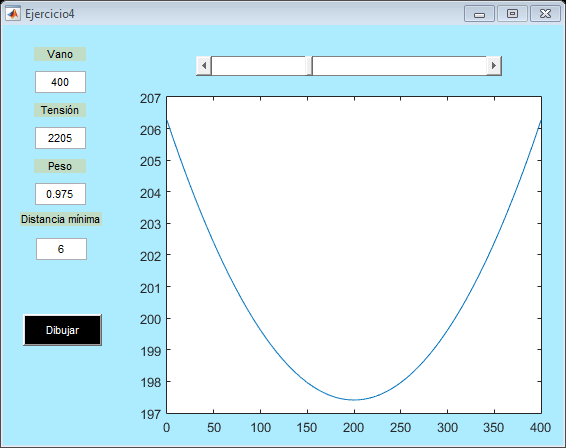
GUI
type Ejercicio4
Ejercicio4
function varargout = Ejercicio4(varargin)
% EJERCICIO4 MATLAB code for Ejercicio4.fig
%      EJERCICIO4, by itself, creates a new EJERCICIO4 or raises the existing
%      singleton*.
%
%      H = EJERCICIO4 returns the handle to a new EJERCICIO4 or the handle to
%      the existing singleton*.
%
%      EJERCICIO4('CALLBACK',hObject,eventData,handles,...) calls the local
%      function named CALLBACK in EJERCICIO4.M with the given input arguments.
%
%      EJERCICIO4('Property','Value',...) creates a new EJERCICIO4 or raises the
%      existing singleton*.  Starting from the left, property value pairs are
%      applied to the GUI before Ejercicio4_OpeningFcn gets called.  An
%      unrecognized property name or invalid value makes property application
%      stop.  All inputs are passed to Ejercicio4_OpeningFcn via varargin.
%
%      *See GUI Options on GUIDE's Tools menu.  Choose "GUI allows only one
%      instance to run (singleton)".
%
% See also: GUIDE, GUIDATA, GUIHANDLES

% Edit the above text to modify the response to help Ejercicio4

% Last Modified by GUIDE v2.5 13-Jan-2019 13:33:10

% Begin initialization code - DO NOT EDIT
gui_Singleton = 1;
gui_State = struct('gui_Name',       mfilename, ...
                   'gui_Singleton',  gui_Singleton, ...
                   'gui_OpeningFcn', @Ejercicio4_OpeningFcn, ...
                   'gui_OutputFcn',  @Ejercicio4_OutputFcn, ...
                   'gui_LayoutFcn',  [] , ...
                   'gui_Callback',   []);
if nargin && ischar(varargin{1})
    gui_State.gui_Callback = str2func(varargin{1});
end

if nargout
    [varargout{1:nargout}] = gui_mainfcn(gui_State, varargin{:});
else
    gui_mainfcn(gui_State, varargin{:});
end
% End initialization code - DO NOT EDIT


% --- Executes just before Ejercicio4 is made visible.
function Ejercicio4_OpeningFcn(hObject, eventdata, handles, varargin)
% This function has no output args, see OutputFcn.
% hObject    handle to figure
% eventdata  reserved - to be defined in a future version of MATLAB
% handles    structure with handles and user data (see GUIDATA)
% varargin   command line arguments to Ejercicio4 (see VARARGIN)

% Choose default command line output for Ejercicio4
handles.output = hObject;

% Update handles structure
guidata(hObject, handles);

% UIWAIT makes Ejercicio4 wait for user response (see UIRESUME)
% uiwait(handles.figure1);
set(handles.slider3,'Value',400)
a=400;
T=2205;
P=0.975;
hmin=6;
handles.x=0:0.1:a;
L=(T/P)*(cosh(P*a/(2*T))-1);
h=(T/P)*sinh(P*a/(2*T));
handles.y=(T/P)*(cosh((P/(2*T))*(2*handles.x-a))-cosh(P*a/(2*T)))+h+hmin;
plot(handles.x,handles.y);

% --- Outputs from this function are returned to the command line.
function varargout = Ejercicio4_OutputFcn(hObject, eventdata, handles)
% varargout  cell array for returning output args (see VARARGOUT);
% hObject    handle to figure
% eventdata  reserved - to be defined in a future version of MATLAB
% handles    structure with handles and user data (see GUIDATA)

% Get default command line output from handles structure
varargout{1} = handles.output;


function edit1_Callback(hObject, eventdata, handles)
% hObject    handle to edit1 (see GCBO)
% eventdata  reserved - to be defined in a future version of MATLAB
% handles    structure with handles and user data (see GUIDATA)

% Hints: get(hObject,'String') returns contents of edit1 as text
%        str2double(get(hObject,'String')) returns contents of edit1 as a double
aux=get(hObject,'String');
a=str2double(aux);
handles.edit1=a;
%%
%
% # ITEM1
% # ITEM2
%
guidata(hobject,handles);

% --- Executes during object creation, after setting all properties.
function edit1_CreateFcn(hObject, eventdata, handles)
% hObject    handle to edit1 (see GCBO)
% eventdata  reserved - to be defined in a future version of MATLAB
% handles    empty - handles not created until after all CreateFcns called

% Hint: edit controls usually have a white background on Windows.
%       See ISPC and COMPUTER.
if ispc && isequal(get(hObject,'BackgroundColor'), get(0,'defaultUicontrolBackgroundColor'))
    set(hObject,'BackgroundColor','white');
end


function edit2_Callback(hObject, eventdata, handles)
% hObject    handle to edit2 (see GCBO)
% eventdata  reserved - to be defined in a future version of MATLAB
% handles    structure with handles and user data (see GUIDATA)

% Hints: get(hObject,'String') returns contents of edit2 as text
%        str2double(get(hObject,'String')) returns contents of edit2 as a double
aux=get(hObject,'String');
T=str2double(aux);
handles.edit2=T;
guidata(hobject,handles);

% --- Executes during object creation, after setting all properties.
function edit2_CreateFcn(hObject, eventdata, handles)
% hObject    handle to edit2 (see GCBO)
% eventdata  reserved - to be defined in a future version of MATLAB
% handles    empty - handles not created until after all CreateFcns called

% Hint: edit controls usually have a white background on Windows.
%       See ISPC and COMPUTER.
if ispc && isequal(get(hObject,'BackgroundColor'), get(0,'defaultUicontrolBackgroundColor'))
    set(hObject,'BackgroundColor','white');
end


function edit3_Callback(hObject, eventdata, handles)
% hObject    handle to edit3 (see GCBO)
% eventdata  reserved - to be defined in a future version of MATLAB
% handles    structure with handles and user data (see GUIDATA)

% Hints: get(hObject,'String') returns contents of edit3 as text
%        str2double(get(hObject,'String')) returns contents of edit3 as a double
aux=get(hObject,'String');
P=str2double(aux);
handles.edit3=P;
guidata(hobject,handles);

% --- Executes during object creation, after setting all properties.
function edit3_CreateFcn(hObject, eventdata, handles)
% hObject    handle to edit3 (see GCBO)
% eventdata  reserved - to be defined in a future version of MATLAB
% handles    empty - handles not created until after all CreateFcns called

% Hint: edit controls usually have a white background on Windows.
%       See ISPC and COMPUTER.
if ispc && isequal(get(hObject,'BackgroundColor'), get(0,'defaultUicontrolBackgroundColor'))
    set(hObject,'BackgroundColor','white');
end


function edit4_Callback(hObject, eventdata, handles)
% hObject    handle to edit4 (see GCBO)
% eventdata  reserved - to be defined in a future version of MATLAB
% handles    structure with handles and user data (see GUIDATA)

% Hints: get(hObject,'String') returns contents of edit4 as text
%        str2double(get(hObject,'String')) returns contents of edit4 as a double
aux=get(hObject,'String');
hmin=str2double(aux);
handles.edit4=hmin;
guidata(hobject,handles);

% --- Executes during object creation, after setting all properties.
function edit4_CreateFcn(hObject, eventdata, handles)
% hObject    handle to edit4 (see GCBO)
% eventdata  reserved - to be defined in a future version of MATLAB
% handles    empty - handles not created until after all CreateFcns called

% Hint: edit controls usually have a white background on Windows.
%       See ISPC and COMPUTER.
if ispc && isequal(get(hObject,'BackgroundColor'), get(0,'defaultUicontrolBackgroundColor'))
    set(hObject,'BackgroundColor','white');
end


% --- Executes on button press in pushbutton1.
function pushbutton1_Callback(hObject, eventdata, handles)
% hObject    handle to pushbutton1 (see GCBO)
% eventdata  reserved - to be defined in a future version of MATLAB
% handles    structure with handles and user data (see GUIDATA)
aux=get(handles.edit1,'String');
a=str2double(aux);
aux=get(handles.edit2,'String');
T=str2double(aux);
aux=get(handles.edit3,'String');
P=str2double(aux);
aux=get(handles.edit4,'String');
hmin=str2double(aux);
handles.x=0:0.1:a;
L=(T/P)*(cosh(P*a/(2*T))-1);
h=(T/P)*sinh(P*a/(2*T));
handles.y=(T/P)*(cosh((P/(2*T))*(2*handles.x-a))-cosh(P*a/(2*T)))+h+hmin;
plot(handles.x,handles.y);


% --- Executes on slider movement.
function slider3_Callback(hObject, eventdata, handles)
% hObject    handle to slider3 (see GCBO)
% eventdata  reserved - to be defined in a future version of MATLAB
% handles    structure with handles and user data (see GUIDATA)

% Hints: get(hObject,'Value') returns position of slider
%        get(hObject,'Min') and get(hObject,'Max') to determine range of slider
aux=get(hObject,'Value');
set(handles.edit1,'String',aux);
aux=get(handles.edit1,'String');
a=str2double(aux);
aux=get(handles.edit2,'String');
T=str2double(aux);
aux=get(handles.edit3,'String');
P=str2double(aux);
aux=get(handles.edit4,'String');
hmin=str2double(aux);
handles.x=0:0.1:a;
L=(T/P)*(cosh(P*a/(2*T))-1);
h=(T/P)*sinh(P*a/(2*T));
handles.y=(T/P)*(cosh((P/(2*T))*(2*handles.x-a))-cosh(P*a/(2*T)))+h+hmin;
plot(handles.x,handles.y);


% --- Executes during object creation, after setting all properties.
function slider3_CreateFcn(hObject, ~, handles)
% hObject    handle to slider3 (see GCBO)
% eventdata  reserved - to be defined in a future version of MATLAB
% handles    empty - handles not created until after all CreateFcns called

% Hint: slider controls usually have a light gray background.
if isequal(get(hObject,'BackgroundColor'), get(0,'defaultUicontrolBackgroundColor'))
    set(hObject,'BackgroundColor',[.9 .9 .9]);
end


% --- Executes on key press with focus on slider3 and none of its controls.
function slider3_KeyPressFcn(hObject, eventdata, handles)
% hObject    handle to slider3 (see GCBO)
% eventdata  structure with the following fields (see MATLAB.UI.CONTROL.UICONTROL)
%	Key: name of the key that was pressed, in lower case
%	Character: character interpretation of the key(s) that was pressed
%	Modifier: name(s) of the modifier key(s) (i.e., control, shift) pressed
% handles    structure with handles and user data (see GUIDATA)